Illumine (Admin module)
The introduction of AI-powered staff scheduling significantly reduced manual effort, enabling the admin to save time and boost overall productivity in daycare operations.
About Illumine
Illumine is a cloud-based management platform for childcare centers, preschools, daycares, and nurseries. It aims to streamline daily operations such as attendance, billing, and scheduling, while also strengthening communication between parents and teachers.
Problem
However, staff scheduling within these environments remains largely manual, time-consuming, and error-prone. Admins spend hours checking staff availability, mentally mapping teachers to classrooms, and resolving conflicts for every shift. This fragmented and inefficient process is the core problem we set out to fix.
- Checking each staff member’s availability one by one
- Mapping staff ↔ classrooms without any system guidance
- Handling leaves and last-minute changes manually
- No visibility into staff performance, workload, or schedule optimization

Research & insights
Research revealed that staff scheduling and related workflows are handled through multiple disconnected tools and manual steps, leading to inefficiency and errors.
Research Methods
- Stakeholder interviews: Spoke with admins and teachers to understand how they create schedules, manage leaves, and handle last-minute changes.
- Workflow observation: Observed how schedules were created using PPTs and manual tracking to identify pain points and delays.
- Existing system analysis: Reviewed the current app and scheduling flows to understand gaps, limitations, and unused features.
- Support & feedback review: Analyzed common issues raised by customers related to scheduling, staffing conflicts, and ratio compliance.
- Competitor scan: Looked at similar childcare and staff-scheduling tools to understand standard patterns and missed opportunities.
Key Insights
- Scheduling takes 2–4 hours weekly due to manual checking
- Admins want a single source of truth for availability, classrooms, and staffing
- Staff want clarity on shifts and a simple way to update availability
- No system shows conflicts, overloads, or performance metrics
User Personas
Admin (Primary User)
- Needs: Quick schedule creation, visibility of conflicts, optimized staffing
- Pain: Manual tracking, constant changes, no insights
Staff (Secondary User)
- Needs: Access to schedule, ability to mark availability/leaves
- Pain: Unclear schedules, last-minute surprises
Current process
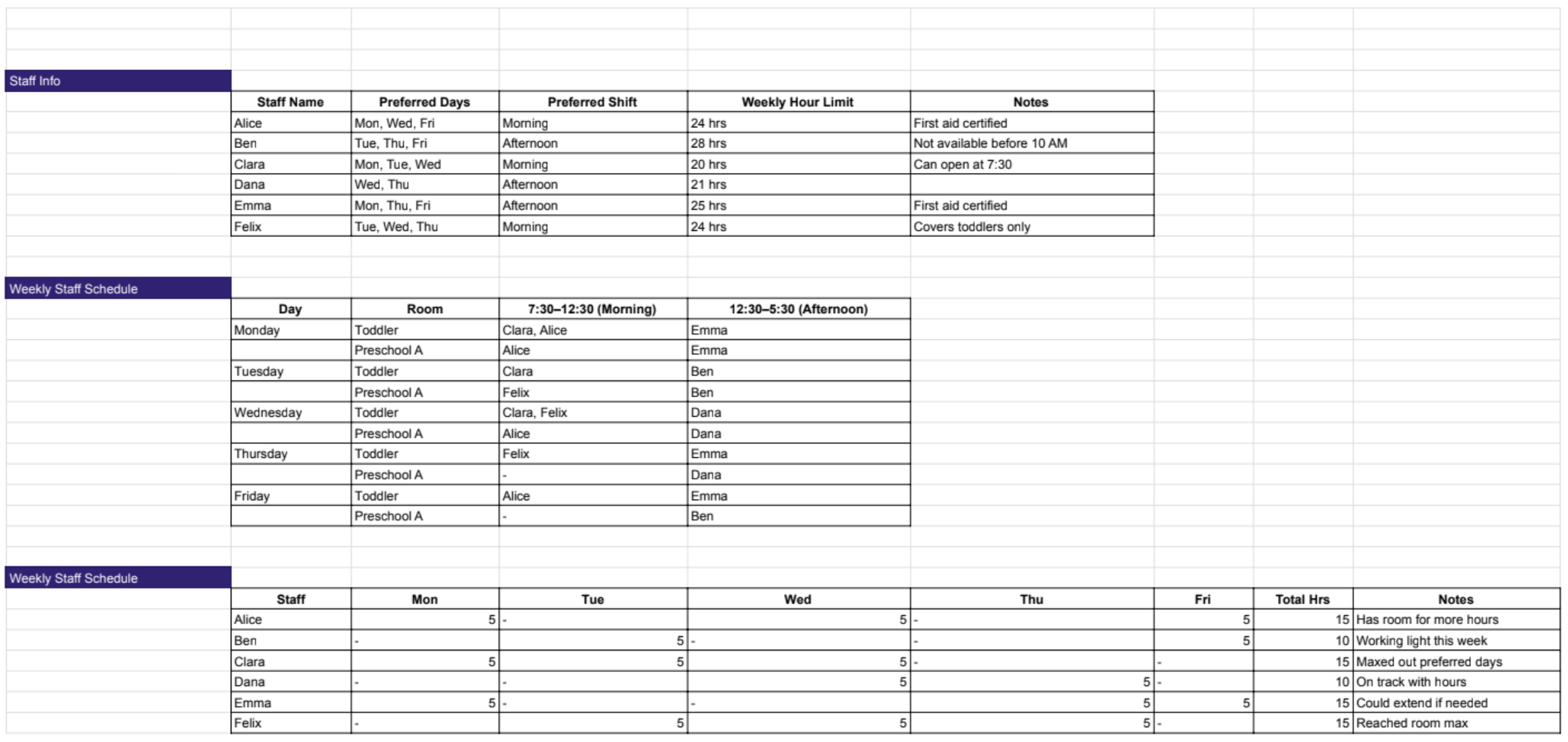
- Teachers share their availability and preferences, which admins note down in PPT files.
- Admins match teachers to rooms and time slots by manually checking and calculating ratios.
- Leave requests and shift changes mean admins have to redo schedules again and again.
- Problems like extra staff, missing staff, or overlapping shifts are usually found after the schedule is made.
- Copying old schedules saves time but often copies old mistakes.
Decisions
After collecting user pain points and my own observations, I’m now ready to move forward with wireframes. I’ve documented all the suggested improvements and combined them with my insights to create rough drafts. I experimented with various versions, exploring different layouts and element placements. This is part of my process, ensuring the final product offers the best user experience and an intuitive, easy-to-use solution.
AI Staff Shift
- Auto Schedule: AI creates staff schedules automatically using availability, room needs, and ratios—no manual calculations needed.
- Alerts: Instantly flags overstaffing, understaffing, conflicts, and ratio issues before schedules go live.
- Staff Requests: Teachers request leaves or shift changes in-app, with admins seeing coverage impact before approval.
- Optimisation: Balances workloads, prevents burnout, and assigns staff efficiently while meeting compliance rules.
- Duplicate Schedule: Quickly copy schedules for staff, rooms, or weeks, with automatic adjustments for leaves and holidays.
Staff Shift Calendar View
- Provides a single, clear view of all staff shifts across days and weeks
- Makes it easy to spot gaps, overlaps, and conflicts at a glance
- Helps admins quickly understand who is assigned where and when
- Supports drag-and-drop edits for faster schedule changes
- Reduces mistakes by showing real-time availability and coverage
- Saves time compared to checking multiple screens or files
Staff Time Card
- Clear view of working hours: Shows total assigned hours, actual hours worked, and overtime for each staff member in one place.
- Easy approval process: Admins can quickly approve or reject time entries without manual checking.
- Tracks overtime accurately: Overtime hours are clearly highlighted, reducing payroll mistakes.
- Easy approval process: Admins can quickly approve or reject time entries without manual checking.
- Supports payroll & compliance: Accurate time data helps with salary calculations and labor compliance.
- Export-ready data: Time card data can be exported easily for payroll or reporting.
Staff Time Log
- Real-time attendance tracking: Easily see who checked in, checked out, or is absent each day.
- Accurate work hours: Automatically records daily, weekly, and monthly hours worked.
- Reduces manual tracking: Eliminates paper registers and spreadsheets.
- Supports payroll accuracy: Ensures correct calculation of regular and overtime hours.
- Saves admin time: One view replaces multiple tools and manual follow-ups.
Results
70% reduction in admin time spent on scheduling
90% fewer scheduling errors (double bookings, missing slots)
Staff satisfaction increased due to clear communication
Improved classroom consistency and operational efficiency

There's more
There's a lot more, in case you are interested in taking a look at in-depth case studies from my previous projects.